

delabs circuits
Electronic Engineering Schematics
Simple Digital Counter - doc00021
The basic digital circuits are Flip Flop and Counter, both are simulated here for you to try out. This circuit can be cascaded to make even a 6 digit event counter, even a simple frequency counter can be made.These are best done with microcontrollers today. Then what if you have to design your own microcontroller on a FPGA, so the basics have to be sound, hence you have to know what gates, flip flops and counters are.
Counter Lab.
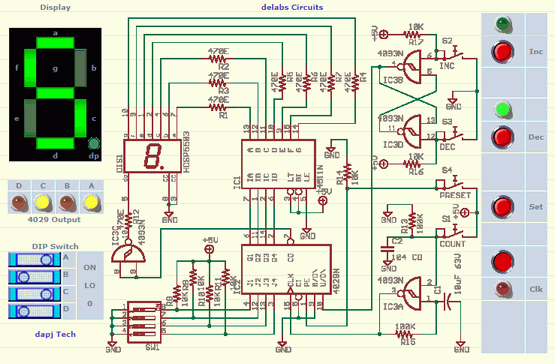
The Counter can be tested by clicking the buttons given below, Watch the LEDs and seven segment display. Inc, Dec, and Set buttons are momentary acting and Clk Button is latching type. The Dip Switch in the Left also can be set by clicking on each of them, watch the switch and LEDs after a click.a.
Set the DIP Switch as you like and then Press the Set button. Now you will see the BCD value in the yellow LEDs named 4029 output. The Decimal value will be seen in the seven segment Display. Now try for different dip switch settings and see the BCD LEDs and Decimal output.
b.
Now Press The Inc and Dec pushbuttons and See the corresponding green LEDs which indicate the state of the Nand gate 4093 Flip Flop. Set it to Increment up-count or Decrement which is down-count.
c.
Now Click the Clk - clock or count button, the switch will latch, press it again to release. If you toggle it once the counter will get a single pulse and it will count it, see the BCD and decimal displays. Now you turn it on and leave it, the counter will keep counting one per second till you turn it off, the clock nand gate is wired to be an oscillator.
Preset Digital BCD Counter xml use iframe part for your Webpage or Blog.
The Counter above is powered up and a power on reset cap across S4-Preset and S2-Inc is assumed, please add in your circuit. Also add 104 CD, 0.1uF ceramic disc cap to all the ICs across the supply pins. (Also add a 104 CD or 1uF cap across Inc switch and one across the Set switch for power on default settings.)
Screenshot
the cadsoft eagle source of the circuit del00020.zip
If LEDs are not lighting up, refresh the page. Browser with JavaScript and images enabled.
Related Reading
...
...
...
...
...
delabs Technologies
30th Aug 2020
...
Disclaimer and Terms of usage
The documents, software, tools and links are provided to enhance the ability of an electronics student, hobbyist or professional by sharing information. The information, links etc. should be used by the website visitor, at his or her own risk and responsibility. There may be concept, design and link errors in the pages.
Creative Work, ideas and documents of delabs can be used for Product Design and Development by R&D Engineers, Hobbyists, Students and even firms for creating useful products. These cannot be used for reprint, replication or publishing online or offline.